 Echolate
Hear any website in your language.
Echolate listens to any website — video, stream, podcast or course — translates the speech as it plays, and speaks the translation on top of the original soundtrack, so you hear both.
Works with YouTube, live streams, podcasts, online courses — anything that plays sound in your browser.
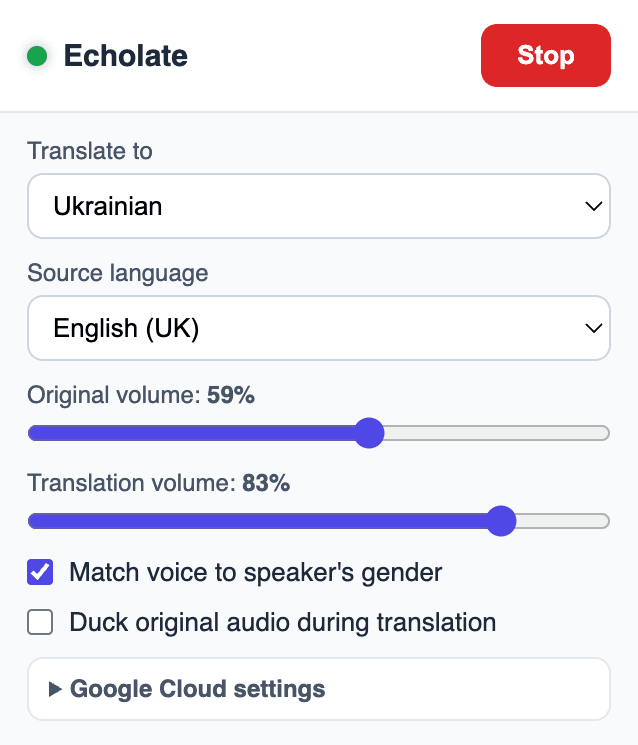
The Echolate popup: pick a language, press Start, keep watching.
How it works
Echolate translates phrase by phrase while the site keeps playing. The original is never muted — it's gently lowered while the translated voice speaks, then comes right back.
Capture
Echolate captures the site's audio while it keeps playing, and detects where each spoken phrase begins and ends.
Recognize
Each phrase is transcribed by Google Speech-to-Text, with the source language detected automatically.
Translate
The text is translated by Google Translation into the language you chose — any of 55+.
Voice-over
Google Text-to-Speech voices the translation, and Echolate mixes it over the original — both stay audible.
Built for listening, tuned for you
Everything happens in your browser, with your own Google Cloud key. No middleman, no account, no tracking.
55+ target languages
Every language Google Text-to-Speech has voices for, plus 85+ source locales for recognition.
Auto language detection
Don't know what language they're speaking? Leave the source on Auto and Echolate figures it out.
Gender-matched voices
Echolate estimates the speaker's pitch and picks a male or female voice for the translation to match.
Volume mixing & ducking
Separate sliders for the original and the translation, with optional auto-ducking while the voice-over speaks.
Live captions
See what was heard and how it was translated — original and translation, side by side in the popup.
Private by design
No backend, no analytics, no accounts. Audio goes straight from your browser to your own Google Cloud APIs.
Good to know before you install
- Translation runs 2–5 seconds behind the original. Echolate translates phrase by phrase, like a consecutive interpreter — that's what keeps it accurate.
- You bring your own Google Cloud API key. A one-time setup of about 10 minutes; our step-by-step guide walks you through it.
- Google bills you directly for API usage. Free monthly quotas cover casual use; beyond them, expect roughly $1.5–2 per hour of continuous translation.
Common questions
A few of the questions we hear most. More answers on the Support & FAQ page.
Why is the translation a few seconds behind?
Echolate waits for a phrase to finish before recognizing and translating it — like a human consecutive interpreter. That adds a 2–5 second delay but makes the translation far more accurate than word-by-word guessing. Read more.
Why do I need my own Google API key?
Because Echolate has no servers. Your audio goes directly from your browser to Google's Speech, Translation, and Text-to-Speech APIs — nobody in the middle, and you only pay Google for exactly what you use. Set one up in ~10 minutes.
Does it work on every website?
Almost — any normal website that plays audio. DRM-protected players (e.g. Netflix) may block capture, and browser system pages like chrome:// can't be captured. Details on Support.
Stop waiting for subtitles.
Add Echolate to Chrome, plug in your key, and hear the web in your language.
Add to ChromeSetup guide